







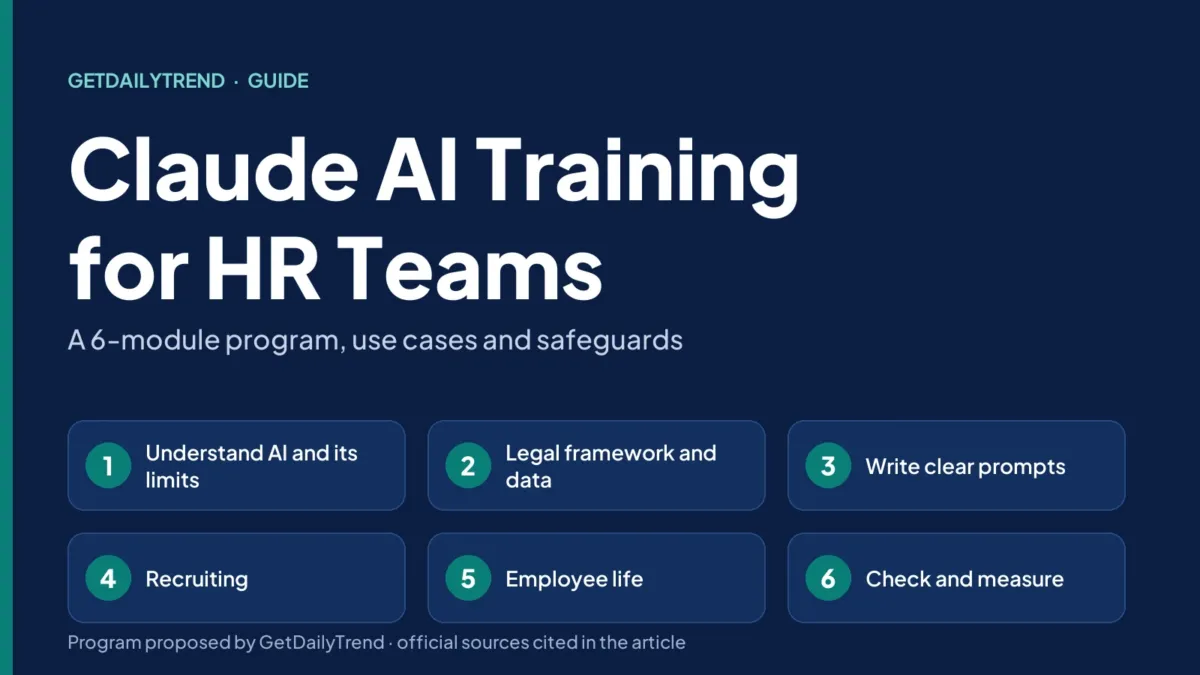
Claude AI training for HR teams is not about showing off a tool. It teaches a team to use it usefully, to protect employee and candidate data, and to recognize the decisions that must stay human. This guide offers a 6-module program, use cases ranked by risk level, sample prompts and the safeguards to put in place before the first session.
The legal and usage-policy points rely on official pages consulted on October 26, 2026: Anthropic’s Usage Policy, the EU AI Act as amended in July 2026, the GDPR and the recruitment guide of the CNIL, the French data protection authority (in French). We apply the European Union framework because those are the texts we read; if your organization operates elsewhere, local law decides. The program, the durations and the sample prompts are GetDailyTrend’s proposal: they have not been tested with an HR team, and this guide does not replace a lawyer’s advice. Please also read our disclaimer and our editorial policy.
Key takeaways
- Claude AI training for HR teams means learning three things: writing clear prompts, protecting personal data, and keeping the decision human for anything that affects people.
- The proposed program has 6 modules and about 14 hours over 8 weeks, with supervised practice on real, non-sensitive documents.
- Screening, ranking or rejecting candidates, promoting, setting pay or evaluating an employee are high-risk uses: a qualified person must actually review the output, and the person concerned must be informed (Anthropic Usage Policy, version of November 12, 2026).
- In Europe, employment is listed in Annex III of the EU AI Act; the obligations for the high-risk systems of that annex apply from December 2, 2027.
- For employee data, prefer a commercial plan (Team or Enterprise): the customer is the controller there, and exchanges are not used by default to train the models.
Contents
Why plan Claude AI training for HR teams?
Giving people access to an AI assistant is not enough. The result depends on how the request is worded, which documents are supplied and how carefully the output is reviewed. In an HR team, three risks add to the time wasted, and the Claude AI training for HR teams has to address each of them.
- Errors stated with confidence. The NIST generative AI profile uses the term “confabulation” for content that is wrong or false but stated with confidence, often called “hallucinations.” The risk grows when a person believes an answer because of its assured tone.
- Bias. The same document describes the amplification of historical and societal biases, performance gaps between groups or between languages, and the poorly grounded decisions that can follow.
- Personal data in the wrong place. A résumé, an annual review, a sick note: HR teams handle sensitive information, and a careless prompt can expose it.
There is also a legal reason. Article 4 of the EU AI Act, as replaced by Regulation (EU) 2026/1744 published in the Official Journal on July 24, 2026, asks providers and deployers of AI systems to take measures to support the development of AI literacy among their staff and the other people using these systems on their behalf, taking into account their knowledge, experience, education and training, and the context of use. The text specifies that it does not require guaranteeing a specific level for each person. Chapters I and II of the regulation, which include this article, have applied since February 2, 2025.
An employer whose teams use an AI system may fall into the category of deployers. Only a lawyer can say whether that is your case. In any event, structured training is a concrete way to show that measures have been taken.
Claude in brief: what it does and what it does not do
Claude is the AI assistant developed by Anthropic. For an HR team the tasks are mostly text tasks: drafting, rewording, summarizing and analyzing documents that the user provides.
Projects are useful to a team. According to the Claude Help Center, a project is a workspace with its own chat history and its own knowledge base. You can upload documents and set project instructions, for example to enforce a formal tone or a role. Projects are available to all users, including on a free account (up to five projects). On a paid plan, the knowledge base expands thanks to a retrieval technique (RAG) when it approaches the context limit. Anthropic also announces a new version of projects, in beta and rolling out in stages: check what your plan offers.
What Claude does not do: it does not know your company until you give it the context, it can be wrong with great confidence, and it takes no responsibility in your place. Anthropic’s Usage Policy says it in its own way for important decisions: a qualified person must remain responsible for what is decided (see below).
One last point, often forgotten: the plan matters. According to Anthropic’s Privacy Center, commercial products (Claude for Work, the API) do not by default use inputs and outputs to train the models, unless the user sends feedback with the thumbs up or thumbs down or explicitly allows that use. The owner of a Team or Enterprise plan can turn off the sending of feedback. The Free, Pro and Max plans are covered by another page, with other rules. For Team and Enterprise plans, the customer is the controller and Anthropic the processor: Anthropic processes the data on the customer’s instructions.
Claude use cases in HR, ranked by risk level
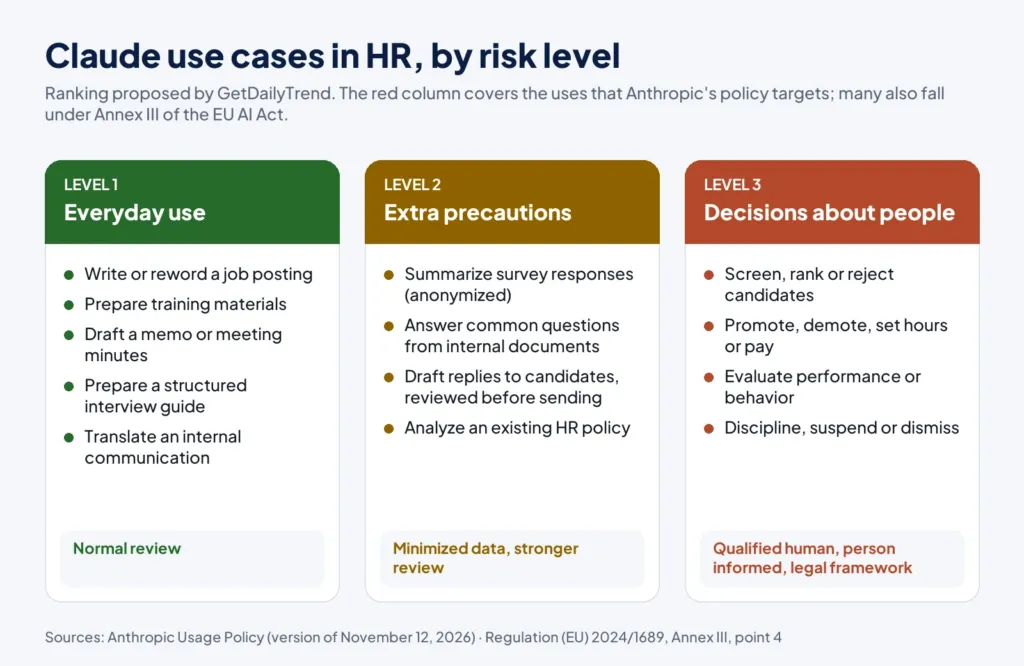
In Claude AI training for HR teams, not all uses are equal. The ranking below is a GetDailyTrend proposal; its third level takes up the uses that Anthropic’s Usage Policy and the EU AI Act treat as high-risk.
Level 1: everyday uses
These are text tasks with no decision about a person: writing or rewording a job posting from a job description, preparing training materials, writing a memo or meeting minutes, preparing a structured interview guide, translating an internal communication. A normal review is enough, as for a text written by a colleague. Avoid slipping in names or personal data.
Level 2: uses that need extra precautions
Here the quality depends on how the data is prepared and reviewed: summarizing the answers to an internal survey, answering frequent questions from internal documents, drafting replies to candidates, analyzing an existing HR policy. The precautions: use only anonymized or strictly necessary data (the data minimization principle, explained below), have every answer reviewed before it is sent, and keep a record of what was done.
Level 3: decisions about people
This is the high-risk zone. Anthropic’s Usage Policy, in the version that takes effect on November 12, 2026, places in the employment domain the screening, ranking, advancement or rejection of candidates, hiring, promotion or demotion, setting or changing hours, duration or pay, and evaluating an employee’s performance or behavior, including for a sanction, a suspension or a dismissal.
Two requirements apply to these uses. A qualified person must actually examine the recommendation, with the power to change it, before it is used to carry out a decision. And the person concerned must be clearly informed that AI was used; naming Anthropic, Claude or the model is not necessary. The policy specifies that these requirements do not replace local law: in case of conflict or of an additional requirement, local law prevails.
European law goes the same way. Annex III of the EU AI Act classifies as high-risk, in point 4, the systems intended for recruitment or selection (placing targeted job ads, analyzing and filtering applications, evaluating candidates) and those intended to make decisions affecting the terms of work relationships, promotion or termination, to allocate tasks based on individual behavior or personal traits, or to monitor and evaluate performance and behavior. Since Regulation (EU) 2026/1744, the obligations of Chapter III (sections 1 to 3) for the high-risk systems of Annex III apply from December 2, 2027.
In practice, for a first Claude AI training for HR teams, the simplest rule is not to use Claude to screen, rank or reject candidates, nor to evaluate employees. Going further requires a legal analysis, an impact assessment and a documented human review procedure, before any trial.
The framework to know before the first session
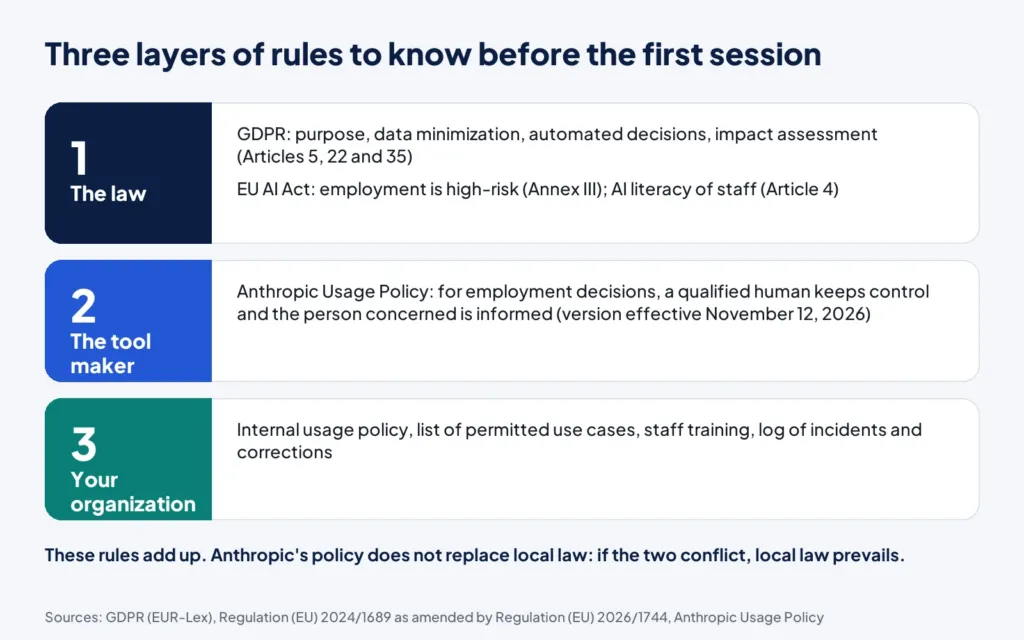
Three layers of rules add up: the law, the tool maker and your organization. The Claude AI training for HR teams must make them concrete for every participant.
The GDPR: purpose, minimization, automated decisions
The GDPR sets principles that the training must make concrete. Article 5 requires in particular that data be collected for specified, explicit and legitimate purposes, that it be adequate, relevant and limited to what is necessary (data minimization), and that it be accurate and kept up to date. For an HR team this becomes a simple rule: give Claude only the data needed for the task, and remove names when you can.
Article 22 gives every person the right not to be subject to a decision based solely on automated processing, including profiling, which produces legal effects concerning them or similarly significantly affects them. Exceptions exist (contract, a law that provides safeguards, explicit consent), but with appropriate measures, including the right to obtain human intervention, to express one’s point of view and to contest the decision. Article 35 requires an impact assessment before processing that is likely to result in a high risk; it requires one in particular for the systematic and extensive evaluation of personal aspects based on automated processing, when significant decisions follow.
On recruitment, the CNIL guide recalls the purpose principle, the collection of only the data strictly necessary to choose a candidate for a given position, candidates’ right to be informed, and the role of the record of processing activities and of the impact assessment as accountability tools. In the pages we consulted, the CNIL does not offer a dedicated sheet on generative AI in human resources: ask your data protection officer or a lawyer for advice.
The EU AI Act: employment and AI literacy
Two points concern training: Annex III, seen above, and Article 4. The text of Article 4 changed in July 2026: it no longer aims to ensure a sufficient level of AI literacy, but to take measures to support its development. The official text replaces the original wording; do not rely on summaries written before July 2026.
Anthropic’s Usage Policy
The Usage Policy is split into three categories: Universal Usage Standards (prohibitions that apply to all users), High-risk Use Case Requirements and Additional Use Case Guidelines. It states that its prohibitions and requirements do not categorically prohibit use by any industry or line of business, provided the use complies with the policy. The version we consulted carries the mention “Effective Nov 12, 2026”: it takes effect on that date. Reread it then, because it defines the employment-related high-risk uses cited above.
Data: choosing the right plan
For anything that involves employees or candidates, prefer a commercial plan, where the customer controls the data, and read its terms. Neither the Anthropic pages we consulted nor this guide say that a tool is “GDPR compliant”: compliance depends on the use, on the contract signed and on the organization put in place. Have your lawyer or your data protection officer review the contract terms.
The Claude AI training for HR teams program in 6 modules
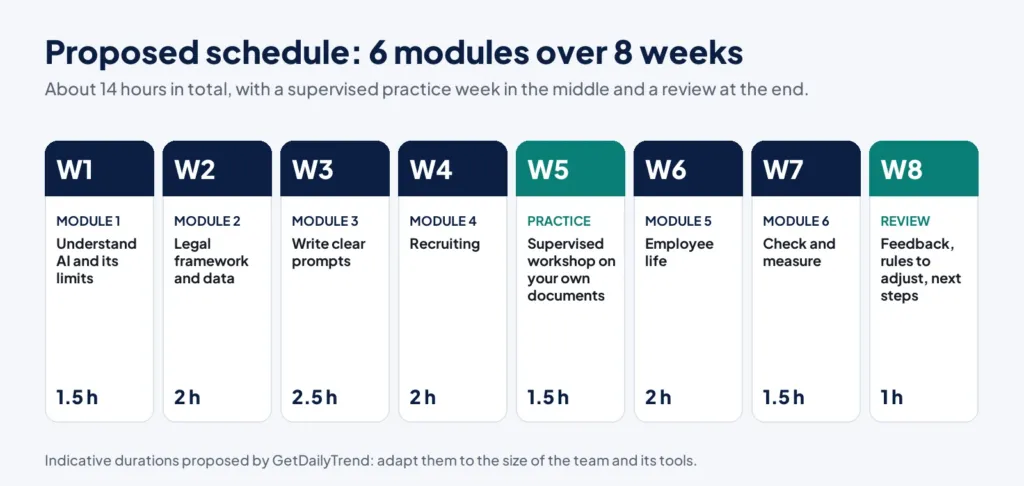
Here is a proposed program: 6 modules, about 14 hours spread over 8 weeks, with a supervised practice week and a review. The durations are indicative and should be adapted to the size of the team. Each module has a goal, an exercise and a deliverable that the team keeps after the session.
Module 1: understand generative AI and its limits (1.5 hours)
Module 1 of the Claude AI training for HR teams: the goal is for every participant to know why a well-written answer can be wrong. We explain, without jargon, that an assistant produces plausible text from what it is given, and we rely on the notions of confabulation and bias described by NIST.
- Exercise: ask Claude three questions whose answers the team already knows (an internal procedure, a company rule, a simple point of law) and mark each error or approximation.
- Deliverable: a list of the errors met, with the way to spot them.
Module 2: legal framework and data (2 hours)
Module 2 of the Claude AI training for HR teams: the goal is to know what can and cannot be sent to the tool. We go through the three layers (law, tool maker, organization), the principles of purpose and minimization, people’s right to human intervention and the choice of plan.
- Exercise: sort twelve fictitious HR documents into three categories: usable as they are, to anonymize first, never to use.
- Deliverable: a one-page usage charter, approved by management and by the lawyer.
Module 3: write clear prompts (2.5 hours)
This is the most practical module of the Claude AI training for HR teams. It relies on the advice in Anthropic’s documentation: be clear and direct, give the context and the reason for the request, provide relevant and varied examples (the documentation recommends three to five), separate instructions, context and data with tags, assign a role, and, for long documents, put them at the top of the prompt and ask Claude to quote the useful passages first.
The colleague test
The documentation suggests a simple test: show your prompt to a colleague who does not know the task and ask them to follow it. If they hesitate, Claude will hesitate too.
- Exercise: turn a vague prompt (“write a job ad for an accountant”) into a structured prompt, then compare the two results.
- Deliverable: three prompt templates approved by the team (see the examples below).
Module 4: recruiting, without screening candidates (2 hours)
In this Claude AI training for HR teams, we work on what is useful and safe: writing clear job postings without criteria foreign to the role, preparing structured interview guides (same questions and same criteria for everyone), and writing replies to candidates. We recall what is not automated: screening, ranking and rejecting.
- Exercise: write a job posting from an anonymized job description, then have a colleague review it for unnecessary or exclusionary criteria.
- Deliverable: a posting template and a structured interview grid.
Module 5: employee life (2 hours)
Module 5 of the Claude AI training for HR teams: onboarding of new hires, training materials, internal communications, answers to frequent questions. Claude’s projects make it possible to share a set of documents and project instructions. The exercise consists of building a question-and-answer project from internal documents without personal data, with a prompt that requires answering only from those documents.
- Exercise: set up a project with three internal documents without personal data (remote-work policy, welcome guide, internal rules), ask ten real employee questions and note the ones that remain unanswered.
- Deliverable: a test Q&A assistant and the list of questions the documents do not cover.
Module 6: check and measure (1.5 hours)
Last module of the Claude AI training for HR teams: we set up the review, the log of use cases and the response to an incident, for example personal data pasted by mistake. We choose a few simple, qualitative indicators: permitted use cases, corrections made during review, incidents, user feedback.
- Exercise: simulate an incident and run through the procedure: who to alert, what to check, how to fix it.
- Deliverable: an incident procedure and a tracking table.
The supervised workshop and the review
Week 5 is a practice session on real, non-sensitive documents, with a facilitator who reviews the prompts. Week 8 is used to take stock: what helped, what caused problems, the rules to adjust and what comes next. It is also the time to check whether Anthropic’s Usage Policy or the regulations have changed.
Sample prompts to adapt
The four examples below apply the principles of module 3 of the Claude AI training for HR teams. They are original templates from GetDailyTrend: adapt the elements in square brackets, and never paste a name or personal data into them.
Write a job posting
<role>You are an HR writer who produces clear, inclusive job postings.</role>
<context>Company in the [sector] sector, [size]. Position: [title]. Duties: [3 sentences]. Essential skills: [list]. Conditions: [contract type, location].</context>
<instructions>Write a posting of about 250 words. Use plain language, without jargon. Include no criterion unrelated to the job. Separate what is essential from what is desirable.</instructions>
<format>Title, introduction, duties (list), profile (list), conditions.</format>
The role, the context and the format are separated by tags, and the ban on criteria unrelated to the job is stated explicitly.
Prepare a structured interview guide
<role>You help an HR team prepare structured interviews.</role>
<context>Position: [title]. Skills to assess: [3 to 5 skills]. Expected level: [junior, experienced or senior].</context>
<instructions>For each skill, propose two situational questions and an example of a strong answer and of a weak answer. The questions must be identical for all candidates. Propose no question about private life.</instructions>
<format>A table: skill, questions, elements of a good answer.</format>
This prompt ranks no one: it produces identical questions for all candidates and a grid that humans will use.
Answer employee questions from documents
<documents>
  <document index="1"><source>[document name]</source><document_content>[document text without personal data]</document_content></document>
</documents>
<instructions>Answer the question using only the documents. First quote the passage you used, then answer in three sentences at most. If the information is not in the documents, write "I don't know" and say which department to ask.</instructions>
<question>[employee's question]</question>
This prompt reuses two ideas from the documentation: put the documents at the top and ask for the passages used to be quoted first.
Summarize the answers of an anonymized survey
<role>You analyze comments from an internal survey.</role>
<verbatims>[anonymized comments, one per line]</verbatims>
<instructions>Group the comments into five themes at most. For each theme, give a title, two short excerpts and what is missing to conclude. Invent no figures. Do not try to identify the authors.</instructions>
The comments must be anonymized before they are pasted. As with any output, review the proposed themes against the original comments.
The safeguards to put in place before you start
Before the first session of the Claude AI training for HR teams, eight points deserve to be settled. They do not replace legal advice.
- Choose a commercial plan for anything that involves employees or candidates, and read its terms.
- Write a one-page usage policy: what is allowed, what is forbidden, who reviews.
- List the forbidden data: health, union membership, family situation, any direct identifier.
- Keep the record of processing activities and ask whether an impact assessment is needed (GDPR Article 35; the CNIL cites the record and the impact assessment as accountability tools).
- Inform people: candidates and employees have the right to be informed of the processing that concerns them, and for high-risk decisions Anthropic’s policy requires saying that AI was used.
- Appoint a qualified person who reviews, and who can change or reject what the tool produces.
- Keep a log of use cases, errors and corrections.
- Have a lawyer validate the applicable labor law and the obligations toward staff representatives: this guide does not cover them.
Review these rules after November 12, 2026, the date on which the version of Anthropic’s Usage Policy consulted for this guide takes effect.
How to evaluate the Claude AI training for HR teams and its use
Evaluating does not mean putting a figure on a time saving that nobody measures. A few qualitative markers are enough at the start:
- Before and after module 3: compare the same request written before and after the training, with the same review grid.
- Quality at review: note, on a sample, the corrections made by the reviewer and their nature (wrong fact, tone, omission).
- Compliance with the rules: number of data incidents, of use cases outside the charter and of questions sent to the lawyer.
- User feedback: what helps, what blocks, what is missing.
- Periodic review: reread the charter whenever the plan, the regulations or the usage policy change.
What is evaluated is the quality of the team’s work and compliance with the rules, not the tool alone: that is what lets you decide what to adjust in the Claude AI training for HR teams.
Common mistakes to avoid
These mistakes follow directly from the risks described above, and they are worth naming out loud in the Claude AI training for HR teams:
- Pasting personal data for convenience. An effective prompt almost never needs a name.
- Letting the tool decide. A ranking of candidates produced by AI, even skimmed by a human, is still an automated decision about people.
- Believing an answer because it is well written. Confabulation is rarely recognizable by its form.
- Training once, then forgetting. The plan, Anthropic’s rules and the law change: schedule a review.
- Forgetting to inform. Candidates and employees must know when AI was used in a decision that concerns them.
- Confusing a generic prompt with a prompt for your job. A prompt copied from the internet ignores your context, your tone and your rules.
A 30-day action plan to launch the Claude AI training for HR teams
- Week 1: choose the plan, name the person in charge, write the one-page usage charter.
- Week 2: check the applicable law with a lawyer, update the record of processing activities, prepare the exercises of module 1.
- Week 3: run modules 1 and 2, review the charter with the team.
- Week 4: run module 3, build the prompt library and schedule the following modules.
Frequently asked questions about Claude AI training for HR teams
Can Claude replace a recruiter?
No, not for decisions. Anthropic’s Usage Policy lists the screening, ranking, advancement and rejection of candidates among the high-risk uses: a qualified person must actually review and be able to change the recommendation, and the person concerned must be informed. Claude remains useful for drafting job postings, interview guides and replies to candidates.
Can you paste résumés into Claude?
It is not advisable until the purpose, minimization, the information given to candidates and the choice of a commercial plan are settled. A résumé is personal data: the GDPR requires purpose, minimization and information. For a training, use fictitious or anonymized documents.
How long does Claude AI training for HR teams take?
The Claude AI training for HR teams proposed here represents about 14 hours over 8 weeks: 6 modules, a supervised workshop and a review. It is a proposal to adapt to the size of the team, not a standard.
Do you need a paid plan?
For employee or candidate data, Anthropic distinguishes its commercial products, where the customer is the controller (Team and Enterprise plans) and where data is not used by default to train the models, from its consumer offerings. Read the terms of the plan you choose before using it.
Is Claude GDPR compliant?
None of the pages we consulted says so, and compliance cannot be declared for a tool: it depends on your use, on your contract with the provider and on your organization (purpose, minimization, information, an impact assessment if needed). Ask your data protection officer or a lawyer for advice.
Is Claude AI training for HR teams mandatory?
Article 4 of the EU AI Act asks providers and deployers of AI systems to take measures to support the AI literacy of their staff, without guaranteeing a specific level for each person. It does not prescribe a training program. Have a lawyer confirm whether you fall within the scope of the text.
How do you limit bias?
Do not use the tool to rank people, write the criteria before drafting, have two people review, and check that postings and grids contain no criterion unrelated to the job. NIST describes the risk of amplified bias and of performance gaps between groups or languages.
Where can you read Anthropic’s rules for high-risk uses?
In Anthropic’s Usage Policy, in the section “High-risk Use Case Requirements.” The version we consulted is dated November 12, 2026: reread it on that date.
Conclusion
Good Claude AI training for HR teams comes down to three ideas: clear prompts, protected data, decisions that stay human. Start with the usage charter and module 3, keep level 3 out of the tool until the legal framework is in place, and plan a review after November 12, 2026. The sources of this guide were consulted on October 26, 2026; they are listed at the bottom of the page with their dates.
An error or outdated information? Write to us: see our corrections policy. To see how we work, read the editorial policy and the About page. Find more guides in the Artificial Intelligence category, in the Technology & AI pillar and in the Career & Business pillar, and see the list of authors.
Sources
- Usage Policy, version effective November 12, 2026
- Is my data used for model training?
- Does Anthropic Act as a Data Processor or Controller?
- What are projects?
- Prompting best practices
- NIST AI 600-1: Artificial Intelligence Risk Management Framework, Generative AI Profile
- Regulation (EU) 2026/1744 amending Regulation (EU) 2024/1689
- Annex III of the AI Act (high-risk use cases)
- General Data Protection Regulation (Articles 5, 22 and 35)
- Le guide du recrutement (in French)